You hold the keys.
We can't move your funds.
Sealda is a non-custodial crypto wallet for iPhone. Your recovery phrase and private keys never reach our servers, so no one at Sealda can move your funds — or recover them for you.
iPhone · iOS 17 or later · English and Ukrainian · Free — no purchases, no subscriptions, no ads
No sign-up. No KYC. No account.

What Sealda does
A wallet that keeps your keys with you and tells you plainly what our servers see.
Your keys, on your iPhone
Create a wallet with a 12-word recovery phrase, restore a 12- or 24-word phrase, or import a private key. Keys are kept on your iPhone, encrypted with your PIN, and never reach our servers. If you turn on Face ID or Touch ID, the app also keeps a second copy of them that Face ID or Touch ID alone can open (see the Privacy Policy).
Three networks
Tron, Ethereum and BNB Smart Chain in one app: TRX, USDT, USDC on Tron; ETH, USDT, USDC on Ethereum; BNB, USDT, USDC on BNB Smart Chain.
Encrypted iCloud backup, if you want it
Turn on backup and Sealda encrypts your recovery phrase or key on your iPhone with a password you choose (Argon2id, AES-256-GCM) before saving it to your iCloud Keychain. We never receive it and can't reset that password. Restore on an iPhone signed in to the same Apple Account with iCloud Keychain on.
Know when money moves
Allow notifications when Sealda asks, and you'll hear about incoming and outgoing transfers; you can turn them off in Settings at any time. Your iPhone adds the wallet's name and, if the other address is in your address book, the contact's name. Tap a notification to open that transaction.
Every wallet at a glance
See each wallet's total in US dollars. Without a connection, Sealda shows your last known balances, marked Offline.
Fees before you confirm
See your available balance and the estimated network fee before you send, and the fee you paid afterwards. Failed transactions are marked Failed. Open or copy any transaction on a block explorer.
Address book and warnings
Save contacts and scan addresses from QR codes. Sealda warns you when a recipient isn't in your address book or is one of your own wallets, and hides the tiny and zero-value transfers scammers use to plant look-alike addresses in your history. Always check the full address.
Hidden wallets
Open a separate wallet from your recovery phrase plus a passphrase. Nothing on your iPhone shows it exists until you enter the passphrase again, apart from discreet activity notifications, if they're on. Not available for wallets imported from a private key. Our servers see its public addresses when you open it and, if notifications are on, that they belong to a hidden wallet on the same iPhone as your other wallets (see the Privacy Policy).
No ads. No tracking SDKs.
No ads, no analytics or tracking SDKs, and no account. The app sends our servers a random install ID — not linked to your name, email or phone number — which we use to protect our service from abuse.
Inside the app
Screens from Sealda for iPhone. The wallets, balances and transfers on them are demo data.
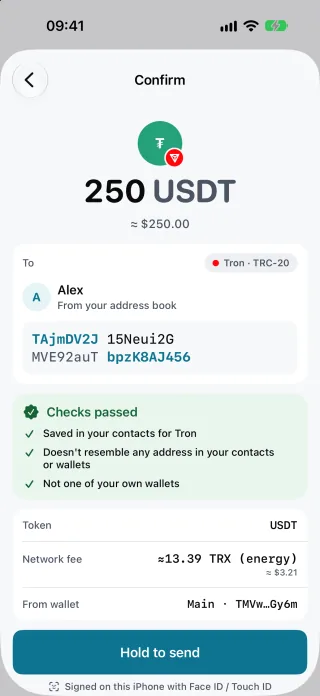
Confirm before you sendThe whole address, the network, the checks it passed and the estimated fee, then hold to send. 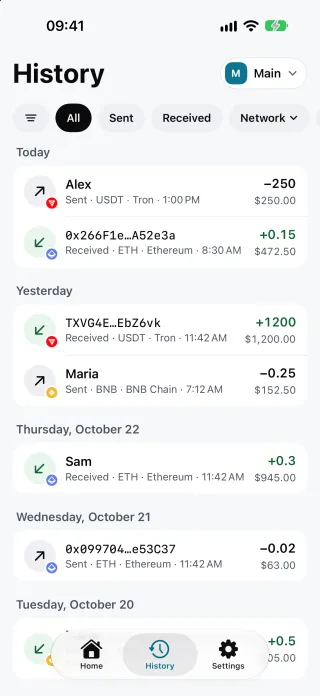
Every transfer, both waysIncoming and outgoing transfers on all three networks, with your contacts' names. 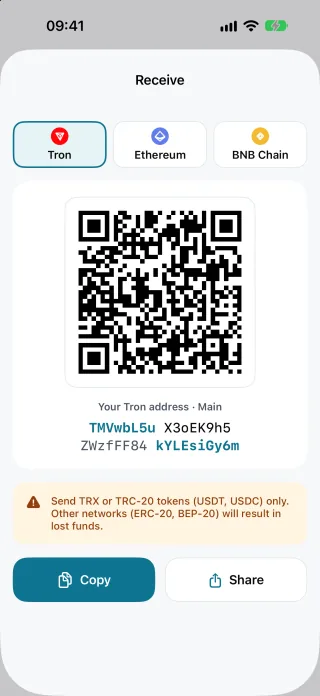
ReceiveYour address and its QR code, one network at a time. 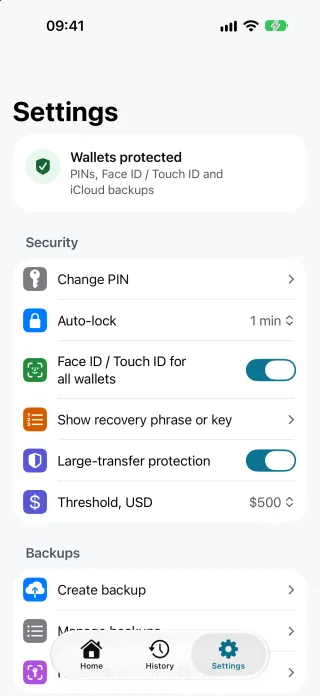
Security settingsChange the PIN, set the auto-lock, turn Face ID or Touch ID on, and get a warning before a large transfer.


Your recovery phrase is your responsibility.
When you create a wallet, Sealda generates a 12-word BIP-39 recovery phrase on your iPhone and asks you to write it down and confirm it. You can view it again later in Settings after entering your PIN. Write it down. Store it offline. We never see it.
There is no "forgot password" link and no support agent who can recover funds. That's the trade-off self-custody asks of you. It also means your funds don't depend on us: your recovery phrase or private key works in other wallets that follow the same BIP-39 and BIP-44 standards.
- Keys are used only on your iPhonePrivate keys are derived (BIP-39 → BIP-32 → BIP-44) and used only in the Sealda iPhone app. They never reach our servers.
- PIN, Face ID and auto-lockYour PIN is stretched with Argon2id and your keys are sealed with AES-256-GCM in the iOS Keychain, bound to that iPhone. Face ID or Touch ID is optional, and Sealda locks itself after the interval you choose.
- What you see is what you signFor Tron sends, your iPhone decodes the transaction our server prepares and checks the recipient, amount, token and fee limit before it signs.
- A connection that's hard to fakeThe app pins the root certificates of our API and checks a digital signature on every response that carries balances, fees, history or transactions.
- Proven cryptographySignatures use libsecp256k1, the library behind Bitcoin Core, and key derivation is tested against the published BIP test vectors.
Supported networks
Get Sealda for iPhone
For iPhone with iOS 17 or later, in English and Ukrainian. Sealda is completely free: no purchases, no subscriptions, no ads and no Sealda fees. You pay only the blockchain's network fee, shown before you confirm.